Slaesh Zigbee 3.0 USB Stick | Complete Guide
Imagine you're trying to turn off your bedroom lights, but your smart home hub has stopped responding again. Your devices are offline, your automations have failed, and you're stuck troubleshooting at midnight. Sound familiar?
The good news? There's a simple solution that costs less than $30.
This complete guide shows you everything about this powerful coordinator. You'll learn how to set it up correctly. You'll discover how to avoid common problems. You'll understand why over 1,600 smart home users have already made the switch.
Whether you're upgrading from an old coordinator or building your first Zigbee network, this guide has you covered. Let's get started.
What Is the Slaesh CC2652RB Zigbee Stick?
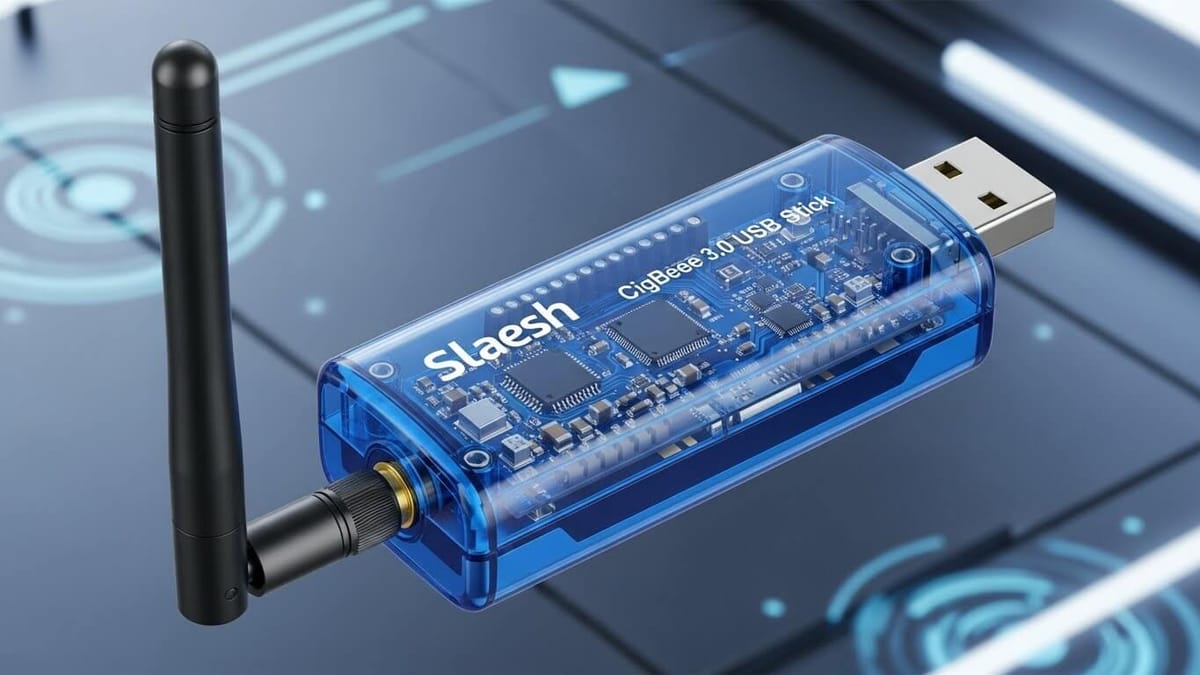
The slaesh zigbee stick is revolutionizing the smart home world, offering a rock-solid alternative to unreliable coordinators and expensive proprietary hubs. Created by Sascha (known online as "slaesh"), a hardware and software engineer from Cologne, Germany, this powerful slaesh cc2652rb device has become the go-to solution for anyone building a reliable Zigbee network.
With over 1,606 orders processed and a thriving community of satisfied users, the slaesh zigbee 3.0 USB stick is trusted by smart home enthusiasts worldwide who are tired of dealing with dropped connections, limited device support, and closed ecosystems.
Here's what makes it different: Unlike those frustrating plug-and-pray coordinators that promise the world but deliver headaches, the slaesh zigbee coordinator combines enterprise-grade stability with open-source flexibility all at a fraction of the cost of proprietary solutions.
Slaesh Zigbee USB Stick - Smart Features
Core Features
- Super tiny CC2652RB multiprotocol 2.4 GHz development stick.
- Ideal as ZigBee 3.0 coordinator/router.
- Works as an OpenThread border router.
- Matter compatible.
- Bluetooth 5 (BLE) support included.
- Low power capable for building battery powered devices.
- Can run for years on a CR2032 coin cell.
- Plug & Play, comes pre-flashed.
- Deadly easy programming, thanks to the automatic-bootloader.
Physical Design
- Super compact at only 50x14mm.
- Fully assembled stick about 7cm long.
- Breakout part just 18x14mm.
- Two antenna options: on-chip or SMA connector.
- Optional 3dB gain antenna available.
- Three status LEDs (Green power, Blue & Orange GPIO).
Technical Capabilities
- Supports 200+ direct children devices.
- Handles 50-100 devices easily in real networks.
- Texas Instruments CC2652RB chipset.
- Nearly all pins accessible via headers.
- 2x12 and 1x9 1.27mm pin headers for development.
- USB powered (under 100mA draw).
- Custom RF protocols support (IEEE 802.15.4).
Software & Compatibility
- Officially supported on zigbee2mqtt.io.
- Works with Zigbee2MQTT version 1.14.2+.
- Compatible with Home Assistant ZHA.
- Supports Code Composer Studio (CCS) from TI.
- Works on Windows, Linux, and macOS.
- Docker container friendly.
- Example projects included for all protocols.
Integration Features
- Works with wpantund for OpenThread.
- Integrates with nymea project.
- IPv6 addresses for OpenThread devices.
- Full Home Assistant integration.
- Zigbee2MQTT add-on compatible.
- Multiple flashing methods available.
Why Should You Choose the Slaesh CC2652RB Over Older Coordinators?
The slaesh stick isn't just another Zigbee coordinator. It's a complete upgrade from outdated models like the CC2531 or CC2538. Here's what makes the slaesh zigbee solution stand out:
Unmatched Versatility
- Zigbee 3.0 corrdinator/ router for seamless device control.
- OpenThread border router capabilities.
- Matter-compatible for future smart home standards.
- Bluetooth 5 (BLE) support included.
Plug-and-Play Simplicity
The slaesh zigbee 3.0 usb stick comes pre-flashed and ready to use. No complicated setup just plug it in and start building your smart home network immediately.
Ultra-Compact Design
Measuring just 50x14mm (7cm fully assembled), the slaesh cc2652rb stick is one of the smallest yet most powerful coordinators available.
See more: Best Zigbee Hubs in 2026
What Makes Slaesh's Design Developer-Friendly?
One of the most impressive features of the slaesh zigbee coordinator is its ultra-low power consumption. The CC2652RB chipset enables battery-powered devices to run for multiple years on a single CR2032 coin cell perfect for sensors and remote devices where changing batteries is inconvenient.
Is the Slaesh Stick Good for Custom Development?
Absolutely! The slaesh cc2652rb provides:
- Access to nearly all free pins through 2x12 and 1x9 pin-headers.
- Three LED indicators (Green power, Blue GPIO6, Orange GPIO7
- GPL v3 software license.
- Full compatibility with Code Composer Studio (CCS) from TI.
- Hardware files available via EasyEDA.
- No need to press button for bootloader mode.
- No need to open enclosure for flashing.
- Flash with ZigStart Multi Tool or Python script.
- Active community support.
Whether you're prototyping new IoT devices or customizing firmware, the slaesh stick gives you complete control.
How Do You Set Up the CC2652RB Stick with Zigbee2MQTT?
The CC2652RB stick is officially listed as a supported adapter on zigbee2mqtt.io. The setup process is straightforward.
Minimum Requirements
You need Zigbee2MQTT version 1.14.2 or higher. A USB extension cable is highly recommended. You also need a host system such as a PC or Raspberry Pi.
Critical Setup Step: Use USB Extension Cable
Do not plug the stick directly into your host system. Always use a USB extension cable. This simple step significantly improves signal quality. It moves the coordinator away from USB 3.0 interference and other electronic noise.
Configuration Best Practices
When configuring the device, you should use specific naming conventions. This is especially important in Docker or Linux environments.
Use long serial port names like this:
/dev/serial/by-id/usb-Texas_Instruments_TI_CC2652RB_Stick...Avoid enumerated syntax like these:
/dev/ttyUSB0  (Can change after reboot)
/dev/ttyACM0  (Not stable)
The enumerated device names can change between reboots. They also change when other USB devices are connected. This causes your coordinator to stop working.
Integration with Home Assistant
The stick integrates seamlessly with Home Assistant. You can use it with Hass.io using the zigbee2mqtt add-on. The add-on was created by danielwelch. Simply add the coordinator through the add-on configuration. Use the stable serial port path when setting it up.
Can the Staesh CC2652RB Stick Work with OpenThread and Matter?
Yes, absolutely! The CC2652RB stick's multiprotocol capability extends beyond Zigbee.
OpenThread Border Router
The stick functions as an OpenThread border router. It supports both NCP (Network Co-Processor) option and RCP (Radio Co-Processor) option.
This allows you to control your local OpenThread network. You can publish your network using wpantund. The tool communicates with OpenThread devices using IPv6 addresses.
Matter Compatibility
Matter was formerly known as Project CHIP. It builds on OpenThread for low power devices. The CC2652RB stick is Matter compatible. This positions it as a future proof investment. The Matter ecosystem is still developing.
Bluetooth 5 Support
The device also supports Bluetooth 5 (BLE). This expands its utility beyond mesh networking protocols. It works for applications requiring Bluetooth connectivity.
Which Smart Home Platforms Work with the Slaesh Zigbee Stick?
Zigbee2MQTT
Yes! The slaesh zigbee stick is officially listed as a supported adapter on zigbee2mqtt.io. In fact, developer koenkk receives rewards for every slaesh cc2652rb sold after fixed costs—supporting the open-source ecosystem.
Minimum requirement: Zigbee2MQTT version 1.14.2 or higher
Home Assistant
The slaesh zigbee 3.0 usb stick integrates seamlessly with Home Assistant (Hass.io) using the zigbee2mqtt add-on created by danielwelch. Setup is straightforward and well-documented.
What Other Platforms Support the Slaesh Stick?
The slaesh zigbee coordinator is actively tested with:
- Nymea project (robust Zigbee support).
- OpenThread networks via wpantund.
- Custom integrations using IPv6 addressing.
How Do You Flash and Update Firmware on the CC2652RB?
One of the standout features of the Slaesh stick is its automatic bootloader. This makes firmware updates remarkably easy.
The Automatic Bootloader Advantage
Many development boards require manual steps. You might need to press buttons to enter bootloader mode. Some require opening the enclosure. Others need shorting pins with jumpers.
The CC2652RB stick features an automatic bootloader. It handles mode switching automatically. This works through the embedded bootloader being enabled. The Backdoor Pin is routed to GPIO Pin 13. It uses active low configuration.
Recommended Flashing Method: ZigStart Multi Tool
The easiest way to flash firmware is using the ZigStart Multi Tool. It provides a user friendly interface for the flashing process.
Alternative Method: Python Serial Bootloader
For command line enthusiasts, you can use JelmerT's serial bootload tool.
Requirements include Python 3 or above, the pyserial library, and the intelhex library.
Follow this process:
- Install dependencies using pip install pyserial intelhex
- Clone the cc2538-bsl.py repository
- Run the flash command with erase, write, and verify flags
The command looks like this:
bash
python cc2538-bsl.py -evw -p /dev/serial/by-id/[your-device] firmware.hexImportant Flashing Guidelines
Don't update unless necessary. If your stick is working properly, avoid updating firmware unnecessarily.
Test on non-production environments first. Always test firmware updates on a test setup. Do this before deploying to your production smart home.
Common Zigbee2MQTT Issue
If Zigbee2MQTT fails after setup, check your configuration. Make sure rtscts: true is NOT included. It should not be in the advanced section of your configuration.yaml file.
Troubleshooting with Debug Firmware
Slaesh provides special debug firmware. It turns both blue and orange LEDs ON at startup. The LEDs turn OFF when Zigbee2MQTT successfully starts. If LEDs stay on, this indicates a version or configuration problem.
You can also test the stick using a Python test script. Another option is a web serial interface. The web interface works with Chrome or Edge browsers only.
Important note: When accessing the serial monitor, ensure it releases RTS and DTR. RTS is connected to RESET Pin. DTR is connected to Bootloader_Enable Pin. This is needed for proper operation.
Where Can You Buy the Slaesh Zigbee Stick?
How Mch Does this Cost
- Direct from Tindie: $29.49
- CloudFree (US reseller): $26.52
- eBay resellers: Similar pricing
The slaesh stick ships from Cologne, Germany, with worldwide delivery available. Orders typically ship within 1–3 days, with at least two shipments per week.
What Other Products Does Slaesh Offer?
Beyond the flagship slaesh zigbee 3.0 usb stick, the product line includes:
- In-wall AC Relay/Switch (Zigbee/OpenThread) - $30.00
- Smart Control for Ikea Bekant Desk - $25.00
- Heating controllers
- BME680 air quality sensors
- Temperature sensors
- Sleepy buttons
How Do You Get Support for Your Slaesh Zigbee Stick?
For technical support, slaesh (Sascha) prefers contact via Telegram for quick responses. The developer is active in the community and has been known to proactively reach out during stock or shipment issues.
Is There a Debug Firmware Available?
Yes! A special debug firmware for the slaesh cc2652rb turns both blue and orange LEDs ON at startup. If these turn off when Zigbee2MQTT starts, it indicates a version or configuration issue.
What Do Users Say About the Slaesh Zigbee Stick?
With an average product rating of 4.37 stars, users praise:
- Excellent performance and stability
- Robust build quality
- Reliable operation with large Zigbee networks
- Great value for money
The slaesh zigbee coordinator has processed over 1,600 orders with 183 reviews, demonstrating its popularity in the open-source smart home community.
Why is the Slaesh CC2652RB Future-Proof?
Yes! The slaesh zigbee 3.0 usb stick is Matter-compatible, ensuring your investment remains relevant as smart home standards evolve.
Thanks to Zigbee 3.0 support and regular firmware updates, the slaesh cc2652rb works with the latest smart home devices from brands like:
- Philips Hue
- IKEA Trådfri
- Aqara
- Xiaomi
- Tuya
- And hundreds more!
Related Searches:
What Development Tools Work with the CC2652RB?
For developers looking to create custom firmware or applications, several tools are available.
Code Composer Studio (CCS)
Texas Instruments provides the official IDE. It includes example projects for several technologies. You can develop ZigBee protocols, OpenThread and Matter applications, Bluetooth 5 (BLE) applications, and custom RF protocols based on IEEE 802.15.4.
Community Support
The device benefits from active development within several communities. The zigbee2mqtt project offers official support. The developer koenkk receives rewards for stick sales. The nymea project provides active testing and development. It has robust ZigBee support and a plugin system.
Open Hardware
Hardware files are available via EasyEDA. The project uses open source licensing. Developers can study the schematic design. They can create custom variations. They can learn from the implementation. They can contribute improvements back to the community.
Quick Troubleshooting Guide
- Problem: Poor signal quality or devices dropping.
- Problem: Zigbee2MQTT won't start.
- Problem: Serial port not found or changes.
- Problem:Device stopped working.
- Problem: Unsure about firmware update.
- Problem: Network issues with CC2531.
Solution: Use a USB extension cable (1 to 2 feet minimum).
Solution: Remove rtscts: true form configuration.yaml advanced section.
Solution: Use long format /dev/serial/by-id... instead of /dev/ttyUSB0
Solution: Test with debug frimware, check config. verify serial port path.
Solution: Don't update if working fine, test on non-production system first.
Solution: Upgrade to CC2652RB for better stability and more devices.
Prevention Tips for Best Experience
Following these guidelines prevents 80% of common user problems:
- Initial Setup: Always use USB extension cable from day one. Never plug directly into your computer or Raspberry Pi.
- Configuration: Use long serial port names in all configs. This prevents connection issues after reboots.
- Updates: Test on non-production system first. Don't update firmware unless you have problems.
- Support: Save Telegram contact info before problems occur. Have your version numbers and configuration ready.
Is the Slaesh CC2652RB Stick Right for You?
The Slaesh CC2652RB Zigbee 3.0 USB stick represents one of the best options currently available. It's perfect for serious smart home enthusiasts and developers. The combination of powerful hardware, multiprotocol capability, easy firmware updates, and strong community support make it an excellent choice.
This stick is ideal for:
- Upgrading from older coordinators like the CC2531.
- Building robust, large scale Zigbee networks.
- Future proofing with Matter and OpenThread support.
- Developers needing hardware access for custom projects.
- Home Assistant and Zigbee2MQTT users seeking stability.
For most users, the CC2652RB stick's superior performance and future proof capabilities justify any minor concerns. The concerns about shipping or pricing are relatively small. At around $26 to $30, it's a worthwhile investment in your smart home infrastructure. It will serve you reliably for years.
Whether you're just starting your Zigbee journey or upgrading an existing network, the Slaesh CC2652RB stick provides the robust foundation your smart home deserves. It offers the versatile platform you need for success.
Ready to upgrade your Zigbee network? The Slaesh CC2652RB stick is available on Tindie. It's also available through select resellers worldwide.